Setting Up a Sandboxed AI Employee: The OpenClaw (Moltbot) Guide
Are you looking to deploy an autonomous AI agent for your team but worried about security or hardware costs? Many people are buying new Mac Minis or exposing cloud servers to the internet risks you don't need to take.
Whether you call it OpenClaw, Moltbot, or Clawdbot, this open-source agent is a game-changer for team productivity. This guide shows you how to set up a secure, sandboxed environment on your own computer to run it safely.
Complete Video Guide
Here is a 20-minute deep dive showing this exact setup from scratch. Watch it here:
<iframe width="560" height="315" src="https://www.youtube.com/embed/3IzXSm7QFig" title="How I setup Openclaw (Moltbot) for my team (No Mac mini)- 20 mins" frameborder="0" allowfullscreen></iframe>The Tech Stack
To keep things isolated and secure, we use a "nested" approach:
- Hyper-V (Windows) or Virtual Machine (Mac): Your primary sandbox.
- Ubuntu 24.04 LTS: The operating system running inside that sandbox.
- OpenClaw (Moltbot): The AI agent software.
- Slack (Socket Mode): How your team communicates with the bot without opening your firewall.
Phase 1: Creating the Sandbox (Hyper-V)
If you're on Windows 11 Pro or Enterprise, Hyper-V is built-in. For Windows Home users, you'll need a quick work-around script (linked in the video description).
1. Enable Hyper-V
Open PowerShell as an Administrator and run:
PowerShell

Restart your computer when prompted.
2. Install Ubuntu
- Download the Ubuntu Desktop 24.04 LTS ISO from ubuntu.com.
- Open Hyper-V Manager and select Quick Create.
- Choose Local Installation Source and select your downloaded ISO.
- Pro Tip: Bump the RAM to 8GB and disable "Dynamic Memory" for much faster performance.
- Follow the Ubuntu installation prompts. When asked about the disk, choose "Erase disk and install Ubuntu"—this only clears the virtual sandbox disk, not your host PC.
Phase 2: Remote Access & Installation
To make copy-pasting API tokens easier, we’ll SSH into the sandbox from our main Windows terminal.
1. Prepare SSH in Ubuntu
Inside your Ubuntu terminal, run:
Bash
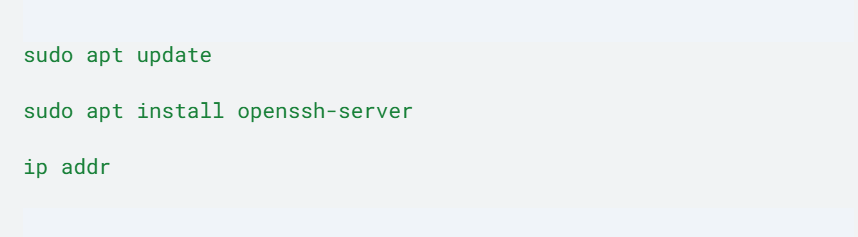
Identify your internal IP (e.g., 172.x.x.x).
2. Connect from Windows
Open a new PowerShell on your host Windows machine and type:
PowerShell

3. Install OpenClaw
Run the official installation script inside your SSH session:
Bash

Follow the onboarding prompts. You can choose to power the agent using Claude (Anthropic), OpenAI, or even local models.
Phase 3: The Slack Connection
We use Socket Mode so the bot "calls out" to Slack. This is the secret to having a team-wide bot without exposing your home network to the internet.
- Create App: Go to api.slack.com/apps and start "From Scratch."
- App Manifest: Use the YAML manifest found in the OpenClaw documentation. This automatically sets the required permissions and scopes.
- Tokens:
- Bot Token (xoxb-): Found under OAuth & Permissions.
- App Token (xapp-): Found under Basic Information (ensure it has the connections:write scope).
- Paste these into the terminal when prompted by the OpenClaw installer.
Phase 4: Pairing & Persona
Once OpenClaw is running, you need to link your Slack user to the agent.
- In Slack, message your new app: Hello.
- The bot will reply with a Pairing Code.
- In your terminal, run:
Bash

Meet Your AI Employee:
You can now define your agent's "Soul." Give it a name like "Jarvis," tell it your team's rules, and set its personality. Because it’s in an isolated Ubuntu sandbox, it can browse the web, read files, and run code safely without touching your personal environment.
Summary of Benefits
- Zero Hardware Cost: No need to buy a Mac Mini; use your existing CPU power.
- Maximum Security: The sandbox acts as a "firewall" for the AI's actions.
- Shared Context: Your whole team gets the benefits of a single, persistent AI memory.
- Persistence: It remembers your team's preferences and "rules of engagement."
Are you looking to deploy an autonomous AI agent for your team? Contact us!
Want to discuss this?
Book a call→